
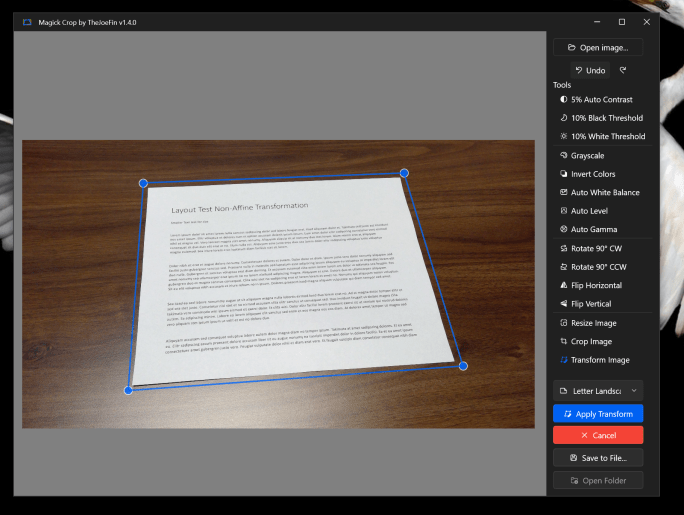
I don't know about you, but I "scan" documents, whiteboards, and more with my phone camera all of the time. While my iPhone camera is everything I would want... the documents are never as clean and clear as I'd like them to be. You can manually try to reverse the perspective distortion with edit tools … Continue reading Make “phone document scans” look perfect with MagickCrop
Tag: Microsoft Store
Generate icons up to 512×512!
Magick.NET rolled out an update from ImageMagick to increase the max size of icons to 512 x 512 and I have updated Simple Icon File Maker to take advantage of that change! The app has just been submitted to the Microsoft Store for certification so the update should be rolling out soon! Get Simple Icon … Continue reading Generate icons up to 512×512!
Pro IAP is coming to Simple Icon File Maker
Coming in version 1.9 users will be able to support independent app development and unlock extra features of Simple Icon File Maker buy upgrading for a one time fee to Pro! This will make development more sustainable and long lasting. I believe there is a huge amount of untapped potential in this app to easily … Continue reading Pro IAP is coming to Simple Icon File Maker
Text Grab v4.4.1 rolling out
Minor update to Text Grab is rolling out. Version 4.4.1 brings mostly bug fixes to the settings pages. Also when Text Grab was installed via the Microsoft Store, new updates would wipe the settings, now that shouldn't happen! Thank you to all the users who have reached out in the past month! It is always … Continue reading Text Grab v4.4.1 rolling out
How to install Tesseract OCR in Windows
Once you have WinGet installed, you can install Tesseract via WinGet with a simple command. Open a PowerShell or Command Prompt window and type the following command: winget install -e --id UB-Mannheim.TesseractOCR This will install the latest version of Tesseract and its dependencies on your system. You can verify the installation by typing the following … Continue reading How to install Tesseract OCR in Windows
